
BREACH · docs
Documentation
Everything about playing BREACH, and everything you need to write your own missions.
Getting started
Open breach-game.github.io/breach/ in a recent browser on a computer. There is nothing to install and no account to create. On the title screen, pick your language (English or French) and how much help you want, then start a new game.
- Keyboard and mouse. BREACH is played in a terminal, so a physical keyboard makes it far more fun. A large screen helps too: the workstation shows several windows side by side.
- Your progress is saved in your browser (IndexedDB), after every action. Close the tab and come back later: you resume where you left off. Clearing the site’s data from your browser starts again from scratch.
- Sound starts on your first click or key press, and can be switched off or balanced in the settings. Effects such as scanlines and glitches follow your system’s reduce motion setting and have their own switch.
The LR-OS workstation
The whole screen is the pentester’s workstation, LR-OS. There is no game menu: everything lives in windows, and only one window is active at a time.
- Terminal: where you type commands. The prompt is
kestrel@lignerouge. - Browser: shows NovaMind’s web pages, drawn by the game itself. View source shows the HTML, comments included.
- Messages: Ada’s briefing, her advice, and the mission objectives.
- Notebook: what you note with
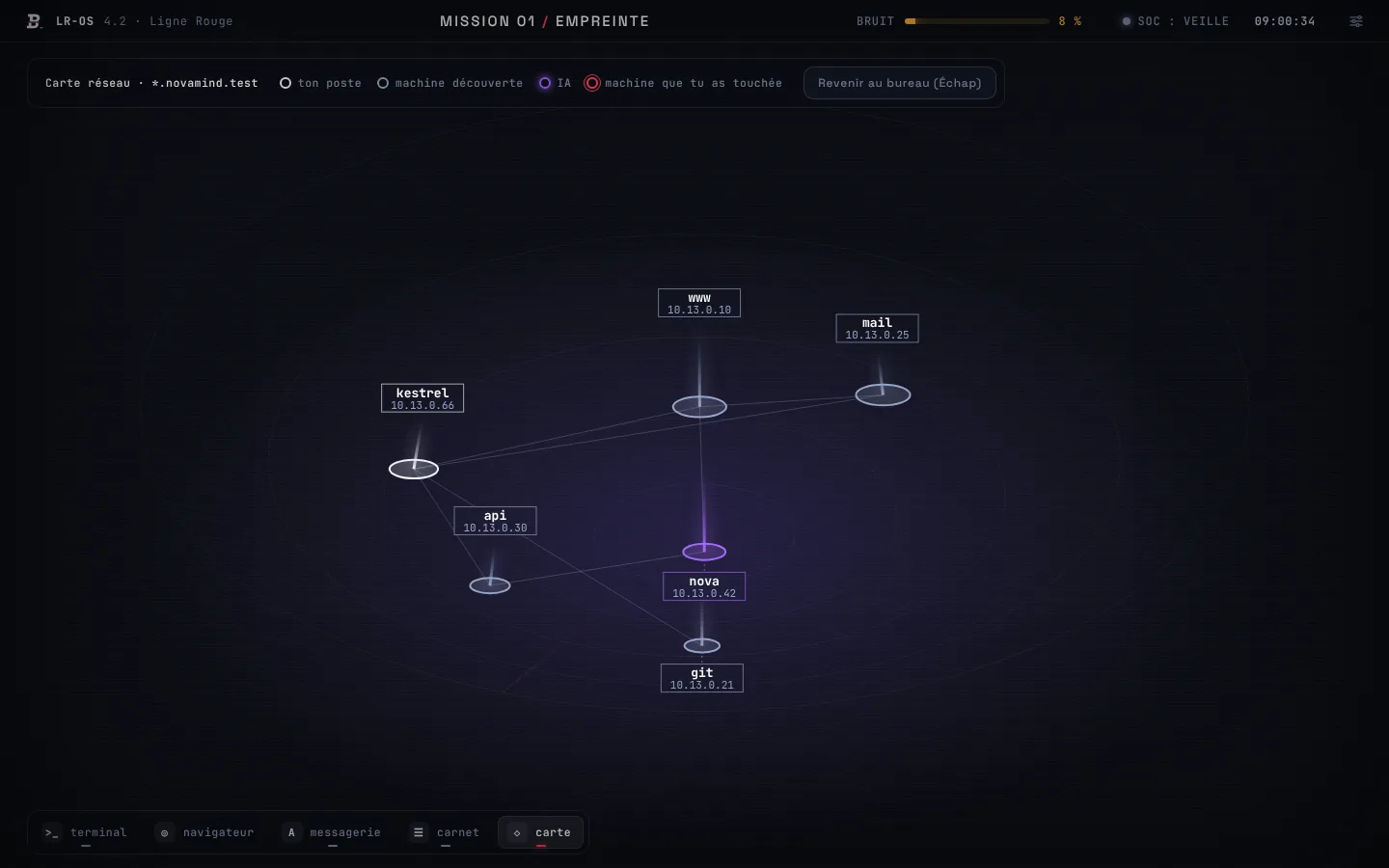
notes add. - Network map: the desktop wallpaper. Hosts appear as you discover them, and turn red once compromised.
Colour always carries meaning, and is always paired with an icon or a label:
- red · attack, compromised host
- cyan · defence, logs, Blue Team
- violet · anything AI
- green · success and flags only
- amber · noise, alert, detection
Commands
The commands imitate the real tools, their options and their output, which stays in English as in real life. None of them sends anything on a real network: they all read the fictional NovaMind world. Type help in the game for the list, and explain <tool> to learn what a tool does and how defenders spot it.
| Game | |
| help | List available commands |
| mission | Show the briefing and objectives again |
| hint | Ask Ada for a hint (three levels, costs points) |
| explain <tool> | Explain a tool and how defenders detect it |
| notes | Notebook: notes add <text> or notes |
| submit FLAG{…} | Submit a flag you found |
| Files | |
| ls, cd, pwd | Move around and list directories (-l, -a) |
| cat, head, tail | Read a file, or its first or last lines |
| grep | Search for a pattern (-i, -n, -v, -r) |
| find | Search for files (-name, -type) |
| wc, echo | Count lines and words, print text |
| Network | |
| nmap | Discover hosts and services |
| dig, whois | Query the DNS, read a domain’s record |
| curl | Send an HTTP request (-I headers, -d sends data, -F sends a file) |
| open | Open an address in the workstation’s browser |
| ping, ssh | Check a host, open a remote session |
| git | clone, log, show: read a repository and its history |
| System | |
| whoami, id, hostname | Who and where you are |
| date, uname | In-game date and system |
| history, clear | Commands you typed, clear the screen |
| sudo | Try it. Ada will have a word about least privilege. |
How a mission works
- The briefing. Ada explains the target and the mandate.
missionshows it again at any time. - The objectives. Each mission has a few, listed in the messages window. Some are optional. You can reach them in any order.
- The flags. A flag looks like
FLAG{...}. When you find one, typesubmit FLAG{...}. The game compares its fingerprint; no language model ever decides whether you succeeded. - The noise gauge. Loud actions (a full port scan, a brutal request) fill it, quiet ones barely move it. At 40% and 70% Ada warns you. At 100%, NovaMind’s SOC spots you: you go back to the last checkpoint, and the detection costs points.
- Hints.
hintasks Ada for help, in three levels, from a nudge to the answer. Each hint costs 10 points. - The debrief. The screen switches to the Blue Team. You see your actions in the target’s log, where you were spotted, and what should have been done. A mission is only finished after its debrief.
Levels and score
| Level | What Ada gives | Multiplier |
|---|---|---|
| Guided | Every command to type, explained. | ×1 |
| Autonomous | The direction to take, not the command. | ×1.25 |
| Expert | The briefing and the objectives only. | ×1.5 |
A mission’s score is the points of its flags, plus 50 per objective, multiplied by the level, minus 10 per hint and 25 per detection. The level that counts is the most helped one you used during the mission: you can switch to more help at any time, but it lowers the multiplier for good. The debrief shows the detail.
Talking to characters
Some missions are about people and AIs: Théo the support intern, Nova the assistant, Iris the CV screener, Atlas the internal agent. You talk to them in a chat window inside a web page, or from the terminal with curl -d "your message" <address>.
Every character is scripted. They recognise what you ask (words, and families of techniques such as role-play, translation, false authority), and the script decides what they say and what they let slip. That is what makes a mission fair and replayable.
Optional: your own Anthropic API key
In the settings you can give your own key and switch on, one by one, two uses, each with its model and a cost estimate:
- Understand my messages: a model recognises what you mean even when worded freely, in another language or with typos. It can only point at what the character already listens for, never invent a password you have to find.
- Reword the replies: a model says the line the script chose, in its own words. It never sees a secret before the script decided to reveal it, and anything doubtful falls back to the scripted line.
The key stays in your browser (session storage, or local storage if you ask), never in your save. Calls go straight from your browser to api.anthropic.com, and are capped per use. Without a key, the game makes no outside request at all.
Community missions
On the title screen, Community missions lists missions written by players and published from the breach-game/packs repository.
- The catalogue is signed (ECDSA P-256). The game checks the signature with a key built into it, then checks every pack against its SHA-256 before reading it.
- Every community pack passed the same validator as the official missions: reserved domains only, no code, a solution that finishes the mission in every language it declares.
- Each community mission is saved separately, so it never touches your campaign.
Write your own mission
A pack is a folder of YAML files. A world pack describes a fictional network: hosts, files, web pages, DNS, characters. A mission pack is played in a world, yours or the official NovaMind one: objectives, flags, rules, hints, guidance and the debrief.
# one folder per pack
packs/jdoe.lost-backup/
  pack.yaml       # id, version, title, authors, languages
  mission.yaml    # objectives, flags, rules, hints, debrief
  i18n/en.yaml    # every text, in English
  i18n/fr.yaml    # and in French
  solution.txt    # the commands that finish the mission
The rules every pack follows
- No real target: reserved domains (
*.test,*.example…) and private or documentation addresses only. - Classes of weaknesses, not exploits: illustrate an OWASP category; nothing should work as-is against a real system.
- Always under a mandate: the story says the player is authorised.
- Every attack has its defence: the debrief explains how to prevent what the player did.
- For players aged 16 and over: thriller tone, humour welcome, nothing shocking.
- Deterministic success: flags are checked by the engine, never by a model.
Check it locally
Clone the packs repository next to the game, install the game’s dependencies, then run its validator on your packs. It checks the schema and the safety rules, and replays your solution in every language:
git clone https://github.com/breach-game/packs.git
git clone https://github.com/breach-game/breach.git
cd breach && pnpm install
pnpm --silent --filter @breach/pack-cli run cli check "$PWD/../packs/packs" --community --with "$PWD/content"
Then open a pull request. CI runs the same checks, a maintainer reviews the story and the lesson, and the merge publishes your mission to the signed catalogue.
Safety and privacy
BREACH never sends a single packet to a machine of the game world: there is no such machine. The commands are a game engine written in TypeScript that runs in your tab. The in-game browser draws pages from data, loads no URL and follows no real link.
| Request | Destination | When |
|---|---|---|
| Game, fonts, missions | the site’s own origin | on load, then cached |
| Community catalogue | breach-game.github.io/packs/ | when you open Community missions |
| Model help | api.anthropic.com | only with your own key, for the uses you switch on |
The game’s Content Security Policy only allows those destinations. There is no analytics, no cookie and no third-party script in the game. This presentation site counts its visits with a self-hosted Umami: no cookie, no personal data, and nothing is counted if your browser sends Do Not Track. The full security model, and how to report a problem, are in SECURITY.md.
FAQ
Does BREACH teach real hacking?
It teaches how attacks work and how to defend against them: reconnaissance, secrets in Git history, social engineering, prompt injection, agents with too many rights, lateral movement. It does not hand out working exploits: the flaws are classes, illustrated on a fictional company.
Is it legal?
Yes. Nothing leaves your browser for the game world, and every target is invented. The game is also a reminder that attacking a real system without written authorisation is a crime.
Who is it for?
Anyone aged 16 and over who is curious about security and AI: students, developers, teams discovering the risks of LLMs, classrooms. The Guided level needs no prior knowledge.
Is it free?
Yes, and open source. The optional model help uses your own API key, billed by its provider.
Can I use it in a class?
Yes: it runs in any recent browser, needs no account, and every mission ends with a debrief that is a ready-made discussion. Missions can also be written for a course and shared as community packs.